
Severity and priority are two different questions, and mixing them up is how a typo on the home page ends up outranking a crash that loses data. This page defines both, shows a matrix with an example in each corner, and gives a rule for settling arguments.
The two definitions
Severity is how bad the bug is. It describes the damage when the bug happens: data lost, a feature broken, a screen misaligned. The person who found the bug can usually judge it, because it is about the bug itself.
Priority is how soon it should be fixed. It describes the order of the work, and it depends on things outside the bug: how many people are affected, a release date, a customer waiting, how much effort the fix takes. The team or product owner sets it.
A bug can score high on one and low on the other. That is the whole point of keeping them apart.
A severity scale you can copy
- Critical. Data is lost or corrupted, the product will not start, a payment is wrong, or there is a security hole. There is no workaround.
- High. A main feature does not work and the workaround is painful or unknown.
- Medium. A feature misbehaves but a reasonable workaround exists.
- Low. Cosmetic issues, small text errors, and anything a user would not notice or mind.
A priority scale you can copy
- Now. Stop other work. Fix and release as soon as it is safe.
- This release. Fix before the next release goes out.
- Next. Plan it for the following cycle.
- Later. Keep it on the list and look again when the list is reviewed.
The four corners
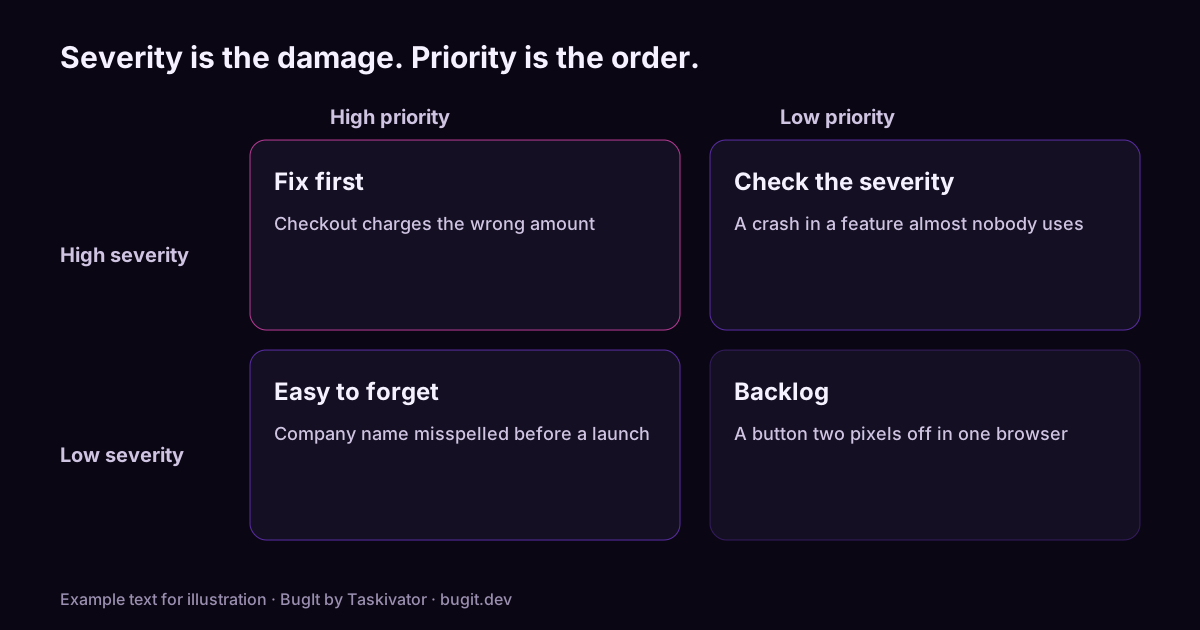
- High severity, high priority. Fix first. Example: checkout charges the wrong amount.
- High severity, low priority. Rare, so ask whether the severity is right. Example: a crash in a feature almost nobody uses.
- Low severity, high priority. The one people forget. Example: the company name is misspelled on the home page the day before a launch.
- Low severity, low priority. Backlog. Example: a button is two pixels off in one browser.
A low severity bug can deserve a high priority when many people will see it or someone important is waiting. A critical bug left for later is the corner worth questioning, because it is rarely safe.
A rule for settling disagreements
When the reporter and the team disagree, ask three questions in order.
- Does it lose data, money or trust? If yes, the severity is high no matter how rare it is.
- How many people hit it, and how often? A bug in a path everyone uses outranks a bug in a path one person uses.
- Is there a workaround that a user will find without help? If not, move it up.
Write the answer in the ticket so the next person does not reopen the argument.
What the reporter should supply
The reporter does not need to set priority, but should give the facts that decide it: what happened, what was expected, how to repeat it, how often it happens and who is affected. The article on how to write reproduction steps covers the first part, and a bug report template developers will read gives a layout with a place for each fact.
Where BugIt fits
When you describe what broke in a rough sentence, BugIt turns it into a structured draft with steps, expected and actual results, and the environment, so the facts that decide severity and priority are on the page when the team triages. You review every draft, and nothing is written to your tracker until you type FILE IT.
Learn more at bugit.dev and taskivator.com/bugit.
The takeaway
Severity is the damage, priority is the order. Score them separately, look at the odd corners, and write down why. A short note in the ticket saves the same argument next week.