
Picture a bug in the sign in screen. On Monday a tester writes "login spinner keeps spinning." On Tuesday a support engineer writes "cannot sign in after the password page." On Wednesday a developer finds a third report that mentions a timeout on token refresh.
Three tickets, three people, one bug. Each ticket holds a piece of the answer. The first has the steps, the second has a customer waiting, the third has the log. Nobody can see the whole picture, and someone will triage the same problem three times.
Duplicates are not a sign of careless people. They are what happens when different people describe the same thing in different words. The good news is that a short search before filing prevents most of them, and a few habits keep the rest manageable.
Why a plain keyword search misses
A search for "spinner" will not find "cannot sign in." A search for "login" will not find "authenticate." Trackers also grow. The ticket you need may be closed, renamed, or sitting under hundreds of newer ones.
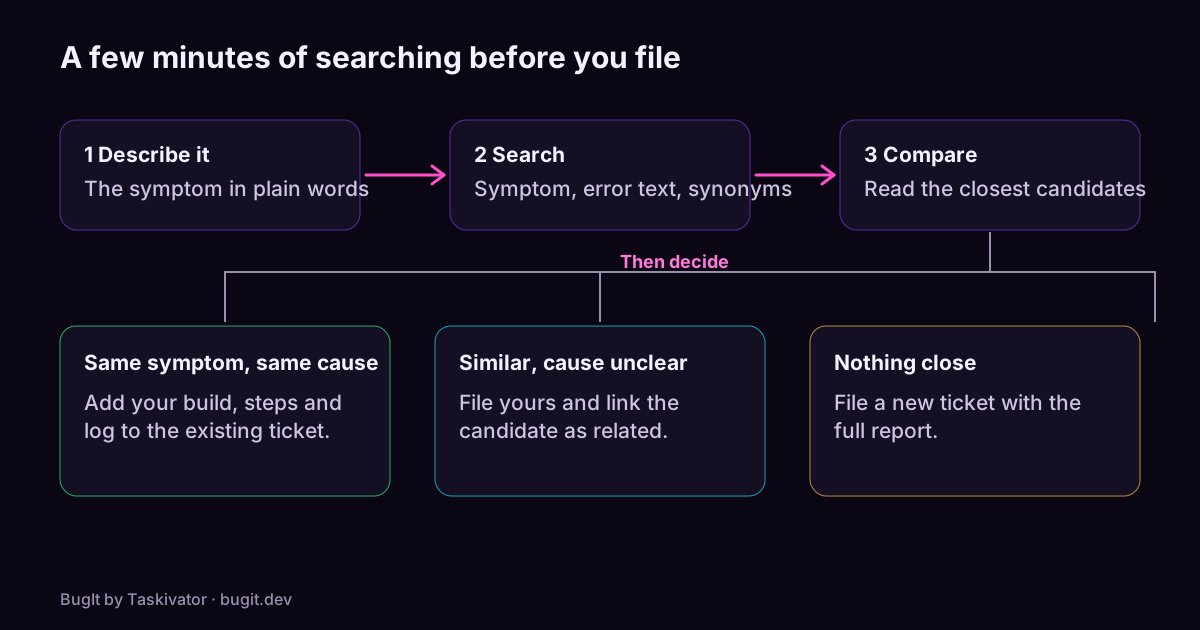
So the search needs a little craft. Here is a routine that takes a couple of minutes.
Six moves before you hit file
- Search the symptom, not your title. Use the words a user would see: the message on screen, the screen name, the action that failed.
- Search the error text. If you have an exception name or a status code, search for it. Developers often paste these into tickets, and they match exactly.
- Try synonyms. Crash, freeze, hang and spinner can describe one fault. So can login, sign in and authenticate.
- Narrow by area. Filter by the component or label for the part of the product you were using, so the list shrinks to something you can read.
- Include closed tickets. A fixed bug that came back is a regression, and the old ticket holds the history and sometimes the cause.
- Follow the links. The match is sometimes one link away from a ticket you already found.
What to do when you find a match
Finding the earlier ticket is the start, not the end. Make the match useful.
- Add what is new. Your build, your steps, a log, or a note that another customer is affected. Evidence is the one thing a ticket can use more of.
- Skip the "me too" ticket. Opening a second ticket to say you see it too splits the evidence again. Comment on the first one.
- Reopen with care. If the match is closed and you can still repeat the problem, follow your team's practice: reopen it, or file a new ticket that links back.
- Ask for a second opinion. If you are unsure, file your ticket and link the candidate as related. The triager decides.
Keeping duplicates down as a team
Individual searching helps, but team habits help more. A tracker is a shared memory, and it only works if people write to it in a way the next person can find.
- Agree on a title format. When tickets for one area read alike, they sort together and duplicates stand out.
- Use a small set of labels for components. Apply them consistently, so a filter finds what it should.
- Close duplicates by linking. Point them at the ticket that survives, so the history stays findable.
- Skim the newest tickets at triage. A five minute scan of what arrived since yesterday catches pairs while they are fresh.
A quick worked example
You hit a crash when exporting a report to PDF. Your first search, "export crash", finds nothing. So you search the message on screen, "could not generate file", and a ticket appears, titled "PDF button does nothing on large reports". Different words, same symptom, and the steps match yours.
You do not file a new ticket. You comment with your build and the log line, and you link the one other ticket you found that mentions the same export screen. Two minutes, no new ticket, and the next developer to open it sees the whole picture.
Where BugIt fits
Searching a tracker properly takes patience, and it is exactly the step people skip when they are in a hurry. BugIt does it for you. When you describe a bug, BugIt searches your tracker for tickets like yours before you see the draft. The search only reads. It gives each candidate a score so you can judge how close it is, and it lists related tickets in the draft so the link is one click away. A quick bug skips the search.
It is a pointer, not a verdict. You review every draft before it is filed, BugIt redacts common personal data as a best effort, and nothing is written to your tracker until you type FILE IT.
Find out more at bugit.dev and taskivator.com/bugit.
The takeaway
Duplicates come from different words for the same problem. Search the symptom and the error text, try synonyms, include closed tickets, and follow the links. When you find a match, add your evidence to it instead of opening another ticket. Two minutes of searching spares a team from fixing, triaging and explaining the same bug more than once.