
You saw it. A button that did nothing, a total that came out wrong, a page that froze. You tried again and it worked. You tried a third time and it worked again. Now you are staring at a ticket form wondering how to describe something that has just stopped existing.
Welcome to the ghost bug. It is one of the most frustrating problems in software, because the usual advice, "give clear steps to reproduce", seems to fall apart when the steps only work some of the time. The good news is that a ghost can be described. It just needs a different kind of report: less about the exact path, more about the conditions around it.
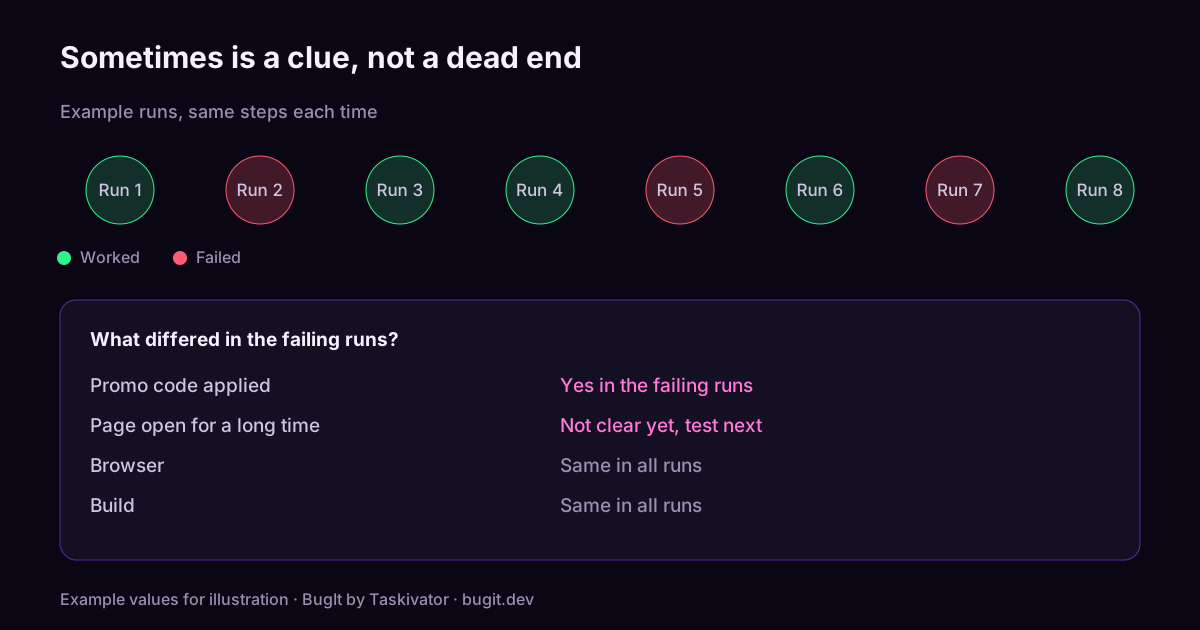
Why sometimes is a clue, not a dead end
A bug that appears now and then is not random. Something is different in the runs where it fails. It might be timing, the order of actions, the data in the account, the size of a file, the network, or how long the app has been open. The computer is doing exactly what it was told. Your job is to help someone find the difference.
That changes how you write the report. Instead of one clean path, you are collecting evidence about when it happens and when it does not.
Step one: run it again, on purpose
Before filing, repeat the steps a handful of times and write down what happens each time. A small run log is enough:
Run 1: failed
Run 2: worked
Run 3: worked
Run 4: failed
Run 5: worked
Now you can say how often it happens instead of "sometimes". A developer reading "it failed on two of five runs" knows more than one reading "it is flaky", because the first can be tested and compared.
Step two: change one thing at a time
Look for what separates the failing runs from the working ones. The usual suspects:
- Timing. Did you click quickly after a page loaded? Did it fail when you waited a minute?
- Order. Did you do the steps in a slightly different order on the failing runs?
- Data. A new account, an old account, a long name, an empty field, a large file.
- State. A fresh start versus the app being open for an hour. Logged in versus just logged in.
- Environment. A different browser, device, network, or build.
- Load. Other things running at the same time, or a busy moment on the server.
Change one of these between runs, not three at once. If the failures cluster around one change, you have found the lead.
Step three: capture the failing run
When it fails, grab the evidence immediately, because the next attempt may work and wipe the trail.
- Note the exact time, so someone can find it in the logs.
- Copy the error message if there is one.
- Save the log lines around the failure, trimmed to what matters.
- Write down the build or version.
- If you have a request id or session id, keep it.
Time and build are the two details that turn "it failed once" into "find this moment in the logs".
Step four: write the report for a ghost
An intermittent bug report has the usual parts plus a few that matter more than usual. Here is a shape you can copy:
Title: [Area] Symptom, intermittent

What happens
Describe the failure in plain words.

How often
Failed on 2 of 5 runs with the steps below.

Steps
1. ...
2. ...
3. The step where it goes wrong

Conditions noticed
Failed when the cart had a promo code applied. Worked without one.
Not yet tested on other browsers.

Environment
Build, platform, account type.

Evidence
Time of the failing run, log excerpt, request id.
The "Conditions noticed" and "Not yet tested" lines are the heart of it. They tell the developer what you have ruled in, and just as useful, what you have not checked yet.
What not to do
- Do not wait until you can reproduce it each time. An honest report with a frequency and a few leads beats silence. Some bugs do not become reliable, and they still need fixing.
- Do not guess the cause as if it were a fact. "It looks like a timing issue" is fine. "It is a race condition" is a claim you may not be able to back.
- Do not close your own ticket when it stops happening. A bug that went quiet is often still there. Add a note and leave it open.
- Do not leave out the runs that worked. They are half the evidence.
Where BugIt fits
Ghost bugs are exactly where a report gets thin, because the reporter is tired and the details are slipping away. BugIt is a QA agent that runs in the assistant you already use. You describe what happened in a rough sentence, and it asks for what is missing, such as the build and how often it happens, before it writes the draft. It keeps the error line and the stack from a log you paste, and it redacts common personal data, which is a best effort, so you read the draft before it goes anywhere. You review every draft before it is filed, and nothing is written to your tracker until you type FILE IT.
See bugit.dev and taskivator.com/bugit.
The takeaway
An intermittent bug is a bug with a hidden condition. Run it again and count, change one thing at a time, capture the failing run with its time and build, and write down both what you saw and what you have not yet tried. Describe the conditions, not just the path, and a ghost becomes something a developer can chase.