
It is easier to see what a good bug report looks like next to a bad one. Below are four weak reports, each rewritten, with a short note on what changed. The product details and numbers are made up for illustration.
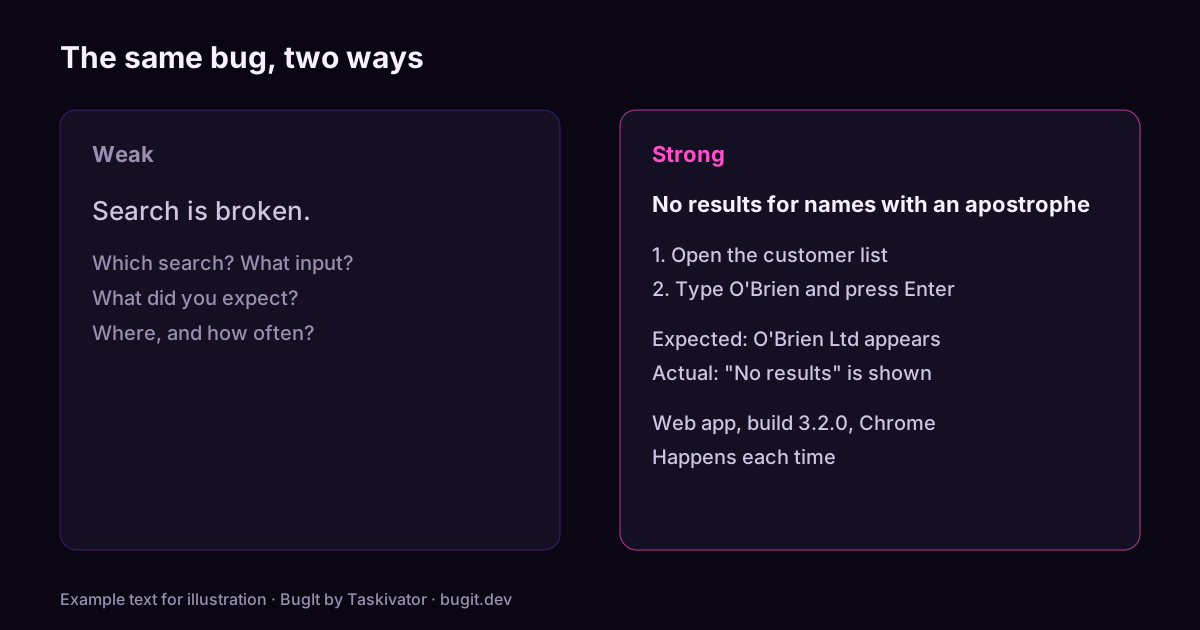
Example 1: the vague complaint
Weak
Search is broken.Strong
Title: Search returns no results for names with an apostrophe
Steps to reproduce
1. Open the customer list
2. Type O'Brien in the search box
3. Press Enter
Expected
The customer O'Brien Ltd appears.
Actual
"No results" is shown. Searching for OBrien finds the customer.
Environment
Web app, build 3.2.0, Chrome, happens each time.What changed. The title names the symptom and the trigger. The steps use the real value. Expected and actual are one line each, and the strong version adds the clue that a search without the apostrophe works.
Example 2: no way to repeat it
Weak
The app crashed when I exported. Please fix.Strong
Title: Export to CSV crashes when the report has more than 50,000 rows
Steps to reproduce
1. Open Reports and choose Order history
2. Set the date range to the last 12 months (about 63,000 rows)
3. Click Export, then CSV
Expected
A CSV file downloads.
Actual
The window closes with no message. With a 30 day range it works.
Environment
Desktop app 3.2.0, Windows 11, 16 GB memory. 3 of 3 tries.
Attached: the log from the minute of the crash, with names removed.What changed. The weak report names the action but not the data. The strong one gives a size threshold, a comparison that works, a count of tries and the log.
Example 3: two bugs in one
Weak
The settings page is a mess. Dark mode is wrong, save does nothing and the
language list is in the wrong order.
Split it into three tickets, each with its own steps:
Title: Save button on Settings does nothing after changing the time zone
Title: Dark mode shows white text on a white card in the Billing tab
Title: Language list is not in alphabetical order
What changed. One ticket, one bug. Each can now be assigned, fixed and closed on its own, and one hard bug no longer holds up two easy ones.
Example 4: an opinion instead of a fact
Weak
The new checkout is confusing and customers will hate it.Strong
Title: Order total is not visible without scrolling on a 13 inch laptop
Steps to reproduce
1. Add any item to the cart
2. Open Checkout on a 1366 by 768 screen
Expected
The total and the Pay button are visible.
Actual
Only the address form is visible. The total is 400 pixels below the fold.
Impact
In a test with five people, two did not find the Pay button.What changed. The feeling became an observation anyone can check, with a measure and a small piece of evidence. The strong report also says who is affected.
The pattern behind all four
- A title that names the symptom and where it happens.
- Numbered steps with the real values.
- One line each for expected and actual.
- The environment and how often it happens.
- Evidence, trimmed of personal data.
- One bug per ticket.
For the checklist version, see how to write reproduction steps, and for layouts to copy into Jira, GitHub or Azure DevOps, see bug report templates.
Where BugIt fits
BugIt takes a rough sentence like the weak examples above and drafts the stronger version: a title, numbered steps, expected and actual results and the environment. It redacts common personal data as a best effort, so you read the draft before it is filed. You review every draft, and nothing is written to your tracker until you type FILE IT.
Learn more at bugit.dev and taskivator.com/bugit.
The takeaway
A good report gives the reader something to do on the first read. Name the symptom, give the steps, say what you expected, say what you saw, and keep to one bug.