
A picture is worth a thousand words, the saying goes. A bad screenshot is worth about four: "see attached, it is broken". The developer opens it, sees a page that looks normal, and wonders what they are supposed to notice.
A good screenshot or recording does something a paragraph cannot. It shows the exact state of the screen at the moment things went wrong. A bad one hides the problem in a sea of pixels, or worse, leaks something that was not meant to be shared. Here is how to take the good kind.
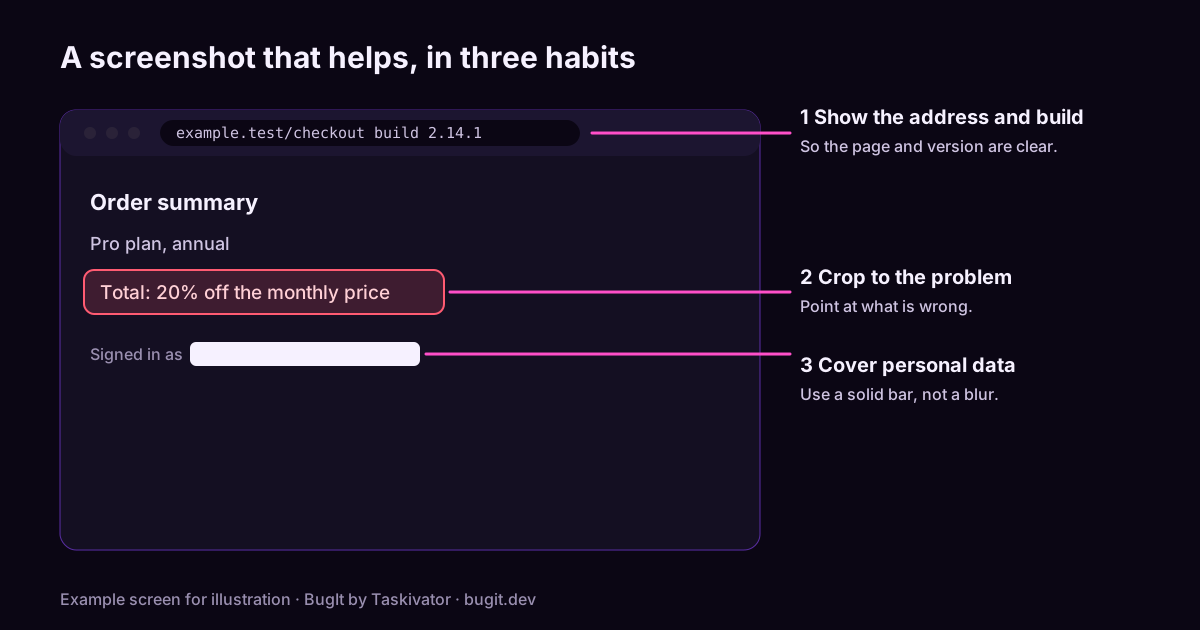
Start with the question the picture answers
Before you press the key, decide what the picture is for. Usually it answers one of three questions:
- What did you see? The wrong total, the error banner, the broken layout.
- Where were you? The page, the screen, the tab, the build.
- What happened next? The sequence that led to the failure, which is a job for a recording.
A screenshot that answers a question is useful. A screenshot taken just in case usually is not.
Make the screenshot easy to read
Small habits make a big difference.
- Include the address bar or window title. It tells the developer which page and environment you were on, and often the build.
- Crop to the problem, with a little context. A full desktop with forty tabs hides the point. A tight crop with no context hides where it is. Aim for the problem plus enough around it to find it.
- Point at the problem. A simple arrow or box around the wrong number saves a developer from guessing which one you meant.
- Show the state, not just the result. If a dropdown was open or a field was filled, capture that, not the page after it closed.
- Say what you expected in the ticket. A screenshot shows what happened. Only you can say what should have happened.
When a recording beats a screenshot
A short screen recording is better when the problem is about motion or order: something that flickers, a button that responds late, a sequence of clicks that leads to a failure. Keep it short, start from a state a stranger can reach, and say in the ticket at which moment the problem appears, for example "the error shows at about the ten second mark". A developer should not have to watch a long clip to find one second.
If the problem is a message or a value, a screenshot is faster to read, and the text can be copied from the page into the ticket. Quote the text as well. It makes the report searchable, and someone looking for a duplicate will find it.
Take the privacy check seriously
This is the part people skip, and it is the part that matters most. A screenshot is a copy of whatever was on your screen, and screens hold more than you think.
Look for:
- Email addresses and names, in the page itself, in a header, or in a profile menu.
- Customer data, such as order details, account numbers or addresses.
- Access tokens, keys and passwords, in a URL, a settings page, or a console.
- Other tabs and windows, which can show up in the frame or in the title bar.
- Notifications, which pop in at the worst moment with a message from someone else.
- Browser autofill, which can fill a field you did not mean to show.
Cover what should not be shared with a solid bar, not a light blur. A heavy blur can sometimes be reversed, and a solid shape cannot. Check the final image, not the original, before you attach it. For recordings, watch the clip once from start to end before you upload it, because a single frame is enough to leak something.
A ticket is read by more people than the one you are writing for, and it often outlives the bug. Treat what you attach as something that will be seen later by someone you have not met.
Name and attach files sensibly
- Give files names that say something, such as checkout-total-wrong.png instead of Screenshot 2.png.
- Attach the image to the ticket instead of pasting a link that may expire.
- Keep the file small enough to open quickly.
- Mention in the description what each file shows, in a line each.
Pair the picture with text
A screenshot is evidence, not the whole report. The steps to reproduce, the expected and actual results, and the build still belong in words. A good rule: if the screenshot were deleted, the report should still make sense.
Where BugIt fits
BugIt is a QA agent that runs in the assistant you already use. You describe what broke in a rough sentence, and it writes the report in your team's shape: title, steps, expected and actual, severity and the evidence you gave it. It redacts common personal data in what it drafts, which is a best effort, so you read the draft before it goes anywhere. You review every draft before it is filed, and nothing is written to your tracker until you type FILE IT. Images and recordings you attach are yours to check, so keep the privacy habits above.
Find out more at bugit.dev and taskivator.com/bugit.
The takeaway
Decide what the picture is for, crop to the problem with a little context, include the address and build, and point at what is wrong. Use a short recording for motion and order. Before you attach anything, look for personal data and secrets and cover them with a solid bar. Then write the report in words as well, so the ticket stands on its own.